Making Interactive Posts on Social Media Work for You
Published on 2025-12-03
Think of an interactive social media post as anything that asks your audience to do something. It’s not just a message you broadcast for them to see; it's content designed to get a specific, direct reaction—like casting a vote in a poll, swiping through a carousel, or dropping an answer in the comments.
These posts turn a one-way announcement into a two-way street.
Why Interactive Posts Are Your Secret Weapon
Let's be real. Just throwing updates out there isn't going to cut through the noise anymore. Professional networks like LinkedIn are absolutely packed with content, and most of it feels like shouting into a void. Your message just gets lost.
This is where interactive posts completely change the game. A standard post is like a billboard on the highway—people might glance at it as they fly by, but they're not stopping to engage. An interactive post, on the other hand, is like pulling up a chair at a coffee shop and starting a conversation. It invites people to sit down and participate.
Shifting From Monologue to Dialogue
The core difference is participation. A typical update might share a link to an article or a company announcement. It’s information, sure, but it asks nothing from the reader. An interactive format is built from the ground up to get a response.
This small shift from talking at your audience to talking with them is what builds a real community. When you ask a question, launch a poll, or genuinely ask for comments, you’re showing people you care about what they think. This accomplishes a few powerful things:
- Builds Relationships: You're opening a line of communication, which makes you and your brand feel more human and accessible.
- Establishes Authority: Leading a thoughtful discussion shows you know your stuff and positions you as an expert in your field.
- Increases Visibility: Social media algorithms love content that gets people talking. They'll show your interactive posts to a much wider audience.
The Power of Participation in Numbers
The data doesn't lie. Interactive content consistently gets way more engagement. On LinkedIn, for example, a multi-image post that encourages interaction can see a 6.6% engagement rate, blowing many other formats out of the water. We see the same pattern on Instagram, where carousels (which require swiping) get more action than single, static images.
It's a clear signal that people prefer content that lets them get involved. If you want to dive deeper, you can explore more social media statistics to see the full picture.
How Interactive Content Forges Real Connections
Have you ever posted a link to a fascinating, in-depth article only to see it get a handful of likes, while a simple poll asking about coffee preferences racks up hundreds of votes? It’s a common frustration, and it all boils down to how we’re wired.
When someone just reads your content, they’re a passive observer. It's like they're sitting in the audience of a big lecture. But when you ask them to participate—to vote, to comment, to answer a question—you’ve just pulled them onto the stage. You've invited them into a conversation, and that simple shift makes all the difference.
Shifting from a Megaphone to a Handshake
Let's be honest, the professionals we admire and trust don't just talk at us. They listen, they engage, and they make us feel seen. Interactive content is how you do that at scale. It’s your chance to stop broadcasting from a corporate tower and start having real, human-to-human conversations.
Asking for an opinion or sharing a quick "this or that" question makes you instantly more relatable. It taps into a deep-seated human need: the desire to have our voice heard. Your interactive post gives people a simple, low-stakes way to share their two cents and feel like they matter.
By inviting your audience to play a part, you're doing more than just posting. You're building a community. Every single vote, comment, and shared answer makes people feel less like a follower count and more like a valued member of the conversation.
This is how you turn passive scrollers into genuine fans. They start to see your profile as a place for interesting discussions, not just another billboard in their feed.
The Give-and-Take of Engagement
There's a powerful psychological trigger at play here, too: reciprocity. When you ask for someone's opinion and then acknowledge their contribution (even with a simple "like" or reply), they feel a natural pull to engage with you again in the future. It’s a two-way street that builds rapport over time.
This foundation of trust and familiarity is pure gold when it comes to business development. Any future outreach feels less like a cold call and more like a natural next step in an ongoing conversation. To make these interactions truly count, it’s smart to apply proven strategies for engagement. You can dive deeper into these by exploring these customer engagement best practices.
Here's a quick look at how different formats help build that bridge:
- Polls: Give people a super easy way to share their preference, making them feel part of a collective voice.
- Q&As: Let you speak directly to someone's specific problem, showing you're genuinely there to help.
- Quizzes: Offer a fun challenge with a personal payoff—the results. This creates a memorable, positive touchpoint with you or your brand.
Each of these isn't just a gimmick to grab attention. It’s a small, deliberate step toward building a stronger, more meaningful professional network.
Choosing the Right Interactive Post Format
Okay, so you're sold on the "why" of interactive content. The next big question is "which one?" Think of it like a toolbox—you wouldn't use a hammer to turn a screw. The same logic applies here.
The best format for your next post really boils down to what you're trying to accomplish. Are you looking to get a quick read on what your audience thinks? Or maybe you want to break down a complex idea or solidify your reputation as an industry expert? Each goal has a perfect tool for the job.
Getting this match right is what separates a post that gets a few quick likes from one that genuinely moves the needle on your professional goals. This simple flowchart can help you decide where to start.
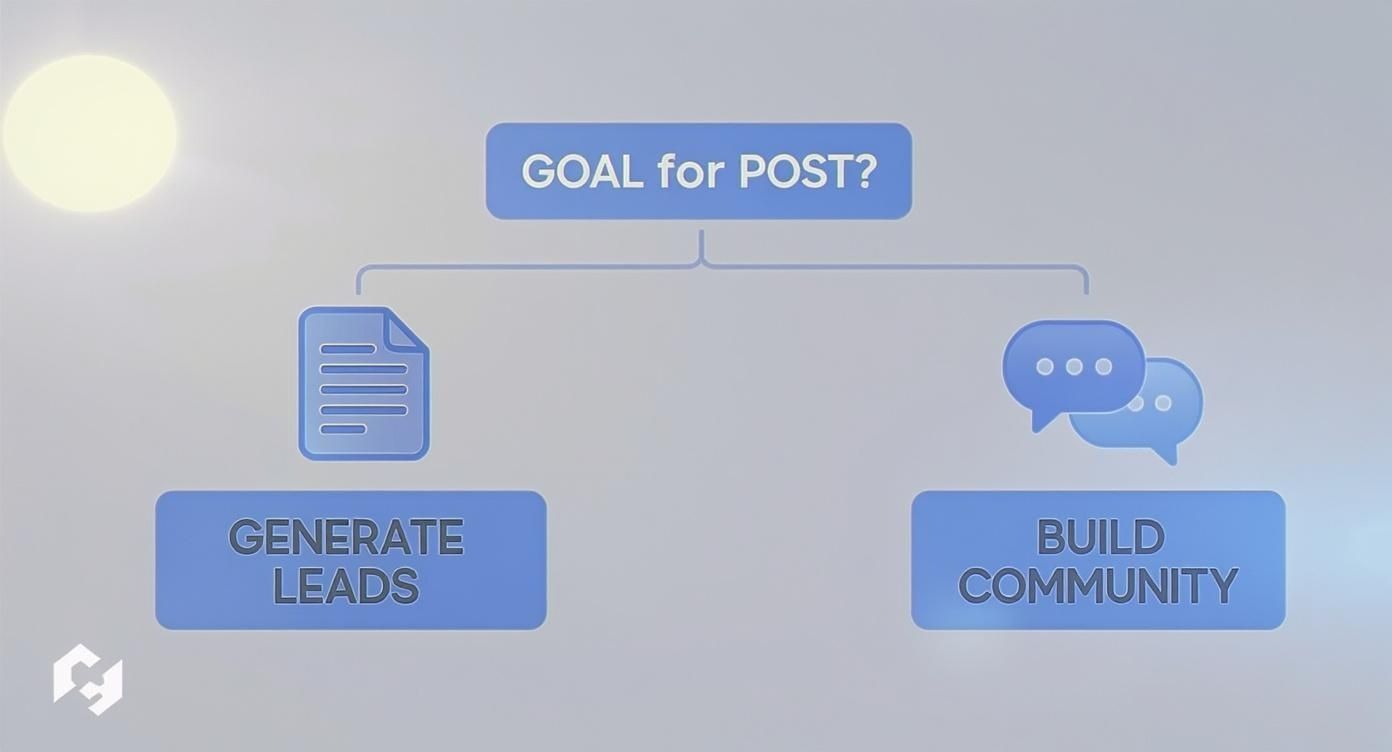
As you can see, your end goal—whether it's generating new business or nurturing your network—should be the starting point for your content strategy.
Polls for Quick Feedback
Polls are your secret weapon for quick, low-effort engagement. They're perfect for taking the temperature of your audience, asking for opinions, or even just sparking a friendly debate. On a busy platform like LinkedIn, their one-click nature is a huge advantage.
Use a poll when you want to:
- Test a new idea: "Which of these topics should I write about for my next blog post?"
- Uncover pain points: "What's the single biggest hurdle you're facing with [industry topic] right now?"
- Start a conversation: "For remote work: Dedicated home office or couch and coffee shop?"
The beauty of a poll is its simplicity. It’s so easy to participate that even passive scrollers will often weigh in, giving your post an instant visibility boost.
Quizzes to Educate and Qualify
Ready to go a little deeper? Quizzes invite your audience to put their knowledge to the test or discover something new about themselves. A smartly crafted quiz is more than just fun; it's a brilliant way to educate people on the problems you're an expert at solving.
For instance, a financial advisor could create a "What's Your Retirement Readiness Score?" quiz. The results deliver immediate value to the user while giving the advisor incredible insight into their audience's needs. While you're brainstorming, looking at how people use quizzes for Instagram can spark some creative ideas for LinkedIn, too.
A great quiz doesn't just broadcast information—it turns learning into an experience. You're not just telling people something; you're helping them discover it for themselves. That makes the lesson stick.
Carousels to Tell a Compelling Story
Carousels, which you often see as swipeable PDF documents on LinkedIn, are phenomenal for storytelling. They let you break down big, complex ideas into a series of bite-sized, easy-to-follow slides. Think of them as mini-presentations or visual guides.
This format is fantastic for tutorials, step-by-step frameworks, or sharing highlights from a report. Because they keep users on your post longer—swiping from one slide to the next—the LinkedIn algorithm sees them as highly engaging and is more likely to show them to a wider audience. If you're looking for more inspiration, these interactive post ideas can help get your creative juices flowing.
Q&A Sessions to Build Authority
Want to establish yourself as a go-to resource? Host a Q&A session. Whether you do it in the comments of a post or as a live video, inviting your audience to "Ask Me Anything" (AMA) is a powerful way to demonstrate your expertise.
This format is a trust-building machine. When you answer questions directly and with genuine insight, you're showing, not just telling, that you know your stuff. This is how you transform a list of followers into a real community that trusts your guidance.
Choosing the Right Interactive Post Format for Your Goal
To help you decide, here’s a quick-reference table that maps the most popular interactive formats on LinkedIn to their primary strategic goals.
| Post Format | Primary Goal | Best For | Example LinkedIn Use Case |
|---|---|---|---|
| Polls | Community Building | Taking the pulse of your audience and sparking quick conversations. | "Which productivity tool is your non-negotiable? A) Asana B) Trello C) Notion D) Something else (comment below!)" |
| Quizzes | Lead Generation | Educating your audience and segmenting them based on their needs. | A "What's Your Leadership Style?" quiz that offers personalized feedback and directs users to a relevant leadership webinar. |
| Carousels | Building Authority | Breaking down complex topics and showcasing step-by-step frameworks. | A 10-slide guide on "How to Negotiate a Higher Salary," with each slide covering a specific tip or tactic. |
| Q&A / AMA | Building Authority | Demonstrating expertise in real-time and building direct relationships. | A post that says, "I've been a cybersecurity consultant for 15 years. Ask Me Anything about protecting your business." |
Ultimately, the best format is the one that feels authentic to you and serves the specific goal you've set for that piece of content.
Creating Your First Interactive Post From Scratch

The idea of creating interactive content might sound like a heavy lift, but it’s actually more straightforward than you’d think. It all boils down to one simple starting point: know what your audience is struggling with. You don’t need to invent a brilliant, viral idea out of nowhere. Just focus on solving a real problem.
Your most powerful interactive posts will come directly from the questions you’re already hearing every day. What came up on your last client call? What confusion did you have to clear up in a sales meeting? These conversations are a goldmine for content ideas.
This way, you’re not just posting for the sake of posting. You’re hitting on a genuine pain point, which makes your content instantly valuable.
From Idea to Engaging Question
Once you’ve pinpointed a real-world problem, your next move is to frame it as a question that people actually want to answer. The trick is to make it incredibly easy for someone scrolling through their feed to weigh in.
Here’s a simple way to do it:
- Identify the Core Problem: Start with a specific pain point. Let's say a common headache for sales reps is getting ghosted after sending a great proposal.
- Brainstorm a Question: Now, turn that problem into a simple, relatable poll. Something like: "What's your go-to move when a promising lead goes silent?" works perfectly.
- Provide Clear Options: Give people a few distinct choices that cover the most common responses. Think "Send a gentle follow-up email," "Try a different channel (LinkedIn)," or "Move on, it's a lost cause." I also love adding an "Other (comment below!)" option—it’s a fantastic way to spark more detailed conversations.
This process takes a big, complex issue and breaks it down into a simple, one-click interaction that gets the ball rolling.
The most successful interactive content doesn’t ask your audience to do a lot of work. It meets them where they are and offers a simple, compelling way to share their perspective, making them feel heard and understood.
Designing and Publishing Your Post
With your question locked in, it’s time to build the post itself. For polls, platforms like LinkedIn have dead-simple tools built right in. If you’re putting together a carousel or a quiz, a tool like Canva has tons of templates that make it easy, even if you have zero design skills. The main thing is to keep it clean and easy to scan.
But remember, hitting "publish" isn't the final step. The real magic happens after you post.
- Engage Immediately: As the votes and comments start rolling in, jump into the conversation. Thank people for sharing their thoughts and ask follow-up questions to dig deeper.
- Keep the Conversation Alive: Know someone with a great take on the topic? Tag them! Your own activity signals to the platform's algorithm that your post is worth showing to more people.
This post-publication engagement is what turns a static post into a living, breathing community discussion.
If you’re ready to try more advanced formats, you can find a ton of practical steps in this complete creator's guide on making interactive video. By following these steps, you’ll be well on your way to creating your first interactive post and building a much more engaged audience.
Measuring What Actually Matters with Your Content
Creating interactive posts that spark a reaction is a great start, but how do you know if your effort is actually paying off? Seeing a post blow up with likes feels fantastic, but those are often just vanity metrics. They look impressive, but they don't tell you if your content is truly helping you reach your professional goals.
Real success isn't just about catching someone's eye for a second. It's about starting real conversations that lead to real results. To see the full picture, you have to look past the like count.
Moving Beyond Vanity Metrics
To measure what really matters, you need to shift your focus from passive "likes" to active participation. The idea is to connect what you're doing on social media to tangible outcomes, whether that's generating new leads, building valuable connections, or establishing yourself as an authority in your field.
Here are the key indicators that tell you if your interactive content is genuinely hitting the mark:
- Quality of Comments: Are you getting one-word replies, or are people sharing thoughtful insights and asking follow-up questions? A rich, meaningful discussion is a huge win.
- Direct Messages (DMs): When a post inspires someone to slide into your DMs, you've successfully guided them from being a passive follower to a potential connection or lead.
- Poll Results and Insights: Don't just glance at how many people voted. Dig into the results. What did you learn about your audience's challenges, preferences, or opinions? This is market research gold.
Focusing on this kind of qualitative data helps you understand the story behind the numbers. If you're looking for a more structured way to tackle this, our guide on how to measure content performance breaks it all down.
The ultimate goal is to measure conversations, not just clicks. A single, insightful comment that sparks a genuine dialogue is often more valuable than a hundred mindless likes.
Connecting Social Data to Business Outcomes
Getting a handle on your analytics is the key to sharpening your strategy. The social media world is crowded—we're talking 5.42 billion users worldwide as of early 2025. This makes interactive content absolutely essential if you want to be heard above the noise. This massive audience has also pushed social ad spending to a projected $276.7 billion, which shows just how much businesses value capturing attention.
At the end of the day, your analytics should answer critical questions. Which types of posts consistently lead to thoughtful discussions? What topics get qualified prospects to send you a DM? By tracking these connections, you can clearly show the value of your content and make smarter decisions that directly impact your bottom line.
Common Questions About Interactive Content
Even with a solid plan, it's normal to have a few nagging questions before diving into interactive content. It's one thing to know the formats, but it's another thing entirely to feel confident using them every day. Let's tackle some of the most common hurdles professionals run into when they make this shift.
Nailing these details is the key to creating a sustainable content rhythm that keeps your audience hooked without causing burnout.
How Often Should I Use Interactive Posts?
This is the big one, and the answer isn't about hitting some magic number. It's all about balance and intent. Your goal is to spark conversations, not just fire a constant stream of questions at your audience. A good rule of thumb is to aim for one or two genuinely engaging, interactive posts per week.
You'll want to sprinkle them in between your other content, like insightful articles, company news, or helpful tips. This variety prevents "interaction fatigue," where people start to tune you out because you're always asking for something. The key is making each interactive post feel like a special, purposeful event.
Your interactive posts should feel like a valuable opportunity for your audience to contribute, not a daily chore. Think quality over quantity—that’s the secret to keeping engagement authentic for the long haul.
This approach makes it much more likely that when you do ask for input, your audience will be ready and willing to jump in, giving each post more impact.
What Are the Biggest Mistakes to Avoid?
Even the best-intentioned interactive posts can fall flat. Knowing what the common roadblocks are can be the difference between a thriving discussion and a post that gets crickets. Here are a few critical mistakes to steer clear of.
- Asking Vague or Confusing Questions: If your audience has to stop and decipher what you're asking, they're just going to keep scrolling. Your questions need to be direct, simple, and easy to answer in a few seconds.
- Failing to Engage with Responses: This is the cardinal sin of interactive content. If you ask for opinions and then ghost the people who give them to you, you're sending a clear signal that their contribution doesn't matter.
- Making It All About You: A poll that asks, "Which of our amazing services do you love most?" isn't a conversation starter; it's a thinly veiled ad. Always frame your questions around your audience's challenges, curiosities, and perspectives.
Avoiding these simple mistakes will help you build trust and a real community, rather than accidentally pushing people away.
Can This Strategy Work in Serious B2B Industries?
Absolutely. In fact, it might be even more powerful in technical or traditionally "serious" B2B fields like finance, engineering, or cybersecurity. The reason is simple: these industries are built on expertise, trust, and relationships. Interactive content is a fast track to building all three.
Instead of a playful poll about coffee, a financial consultant could ask, "What's the biggest misconception you see about retirement planning?" A cybersecurity expert could post a carousel breaking down the three most common phishing tactics and ask which one their network has seen recently. This move from broadcasting to conversation is a major trend. Recent data shows a 58% increase in TikTok users messaging friends and family, and you can see more trends like this in this social media statistics report.
These kinds of interactive posts on social media don't water down your professional credibility—they actually amplify it. You're proving your expertise while showing you’re genuinely interested in solving the real-world problems your audience is facing.
Ready to turn those conversations into meetings? Unibox centralizes your LinkedIn and email outreach, making it easy to manage every interaction and stay on top of your warmest leads. Start your 14-day free trial of Unibox today.